Change Freeze Periods: When, Why, and How
The retailer's peak-season freeze ran from the second week of November to the first week of January, as it had for years. Leadership counted it a success: no change-caused incidents during the busiest six weeks of trading. Then the freeze lifted. The first release of January bundled about 140 changes that had queued up behind it: features, dependency upgrades, two database migrations and a configuration change to the payment gateway. Checkout failed for a share of card payments within an hour. It took most of a day to work out which of the 140 changes was responsible, because all of them had shipped together.
This example is a composite, built from patterns common to retail peak-season operations. The figures are illustrative.
The freeze worked exactly as designed. It removed change risk from six weeks of the year. What nobody had accounted for was where that risk went: into one enormous batch at the thaw, released by a team that hadn't deployed to production in six weeks.
Why the blanket freeze is attractive
The logic is sound as far as it goes. Changes cause a large share of outages. Google's SRE book reports that roughly 70% of outages are due to changes in a live system. During a high-stakes window, such as peak trading, a financial close or a regulated launch, the cost of an outage is higher than usual and the people needed to fix one may be on leave. Fewer changes means fewer chances to break things. A calendar freeze is also simple to communicate and simple to audit.
For a director who has to answer for the release decision, a freeze is defensible in a way that "we kept deploying" is not, at least until the thaw.
What the blanket freeze misses: batch size
The cost of a freeze is not the lost delivery time. It is what the queue does to the next release.
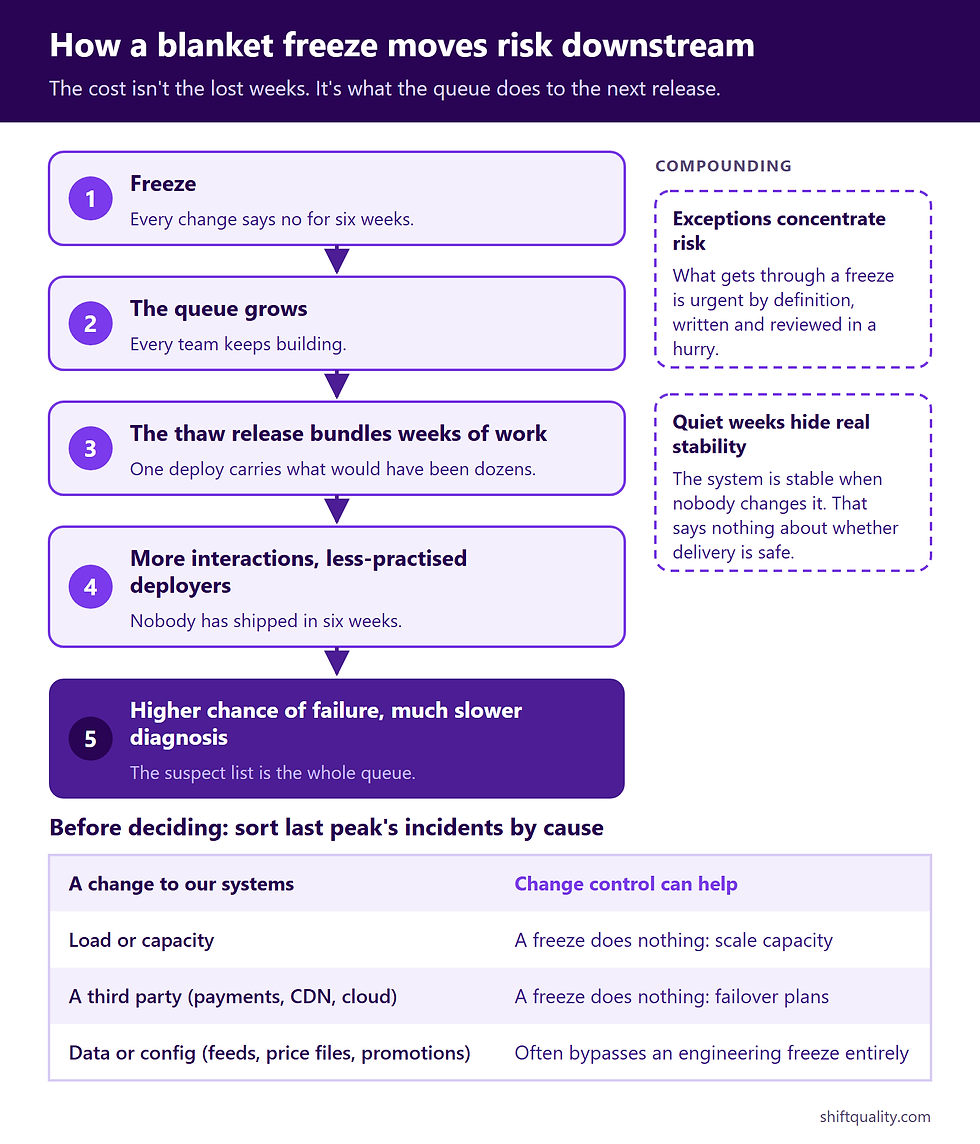
DORA's research on change approval describes the mechanism directly: heavyweight approaches slow delivery, which leads to "the release of larger batches less frequently, with an accompanying higher impact on the production system". A freeze is the most heavyweight approval there is: every change says no for six weeks. The chain runs like this:
Freeze → queue grows (every team keeps building) → thaw release bundles weeks of work → more interactions per release and less practised deployers → higher chance of failure, and much slower diagnosis when it fails, because the suspect list is the whole queue.
Two other effects compound it. Exceptions concentrate risk. The changes that get through a freeze are, by definition, urgent, and urgent changes are written and reviewed in a hurry. The freeze hides the system's real stability. Six quiet weeks show that the system is stable when nobody changes it, which says nothing about whether the delivery process is safe.
The discovery move: what actually broke last peak?
Before deciding on any freeze, look at the incidents from the last high-stakes window, and from the same window the year before if you have it. Sort each by cause:
Cause | What it implies |
A change to our systems | A change control measure can help |
Load or capacity | A freeze does nothing; capacity testing and scaling do |
A third party (payment provider, CDN, cloud region) | A freeze does nothing; failover and supplier contact plans do |
Data (a bad feed, a price file, a promotion configured wrong) | Depends: business-side configuration often bypasses engineering freezes entirely |
In the retailer's case, the previous year's peak incidents were mostly capacity and a promotions misconfiguration entered through a back-office tool that the engineering freeze didn't cover. The freeze was aimed at the one failure source that hadn't caused trouble. That's the data that should decide the shape of a freeze, and it is usually sitting in the incident log already.
How to tell whether your freeze is working: the freeze audit
Run this on your last freeze. You need the change log and the incident log.
Exception ratio. Count changes shipped as exceptions during the freeze, and divide by the normal change volume for the same number of weeks. A high ratio means the freeze isn't real; a ratio near zero with a team still building means everything is queuing.
Thaw batch size. Count changes in the first release, or first two days, after the freeze, and compare them with a normal release.
Thaw incident rate. Count change-caused incidents in the two weeks after the freeze and compare with a normal two-week period.
Cause match. From the discovery table above: what share of incidents during the window would the freeze have prevented?
If the thaw incident rate is above your baseline, the freeze moved risk rather than reducing it. If the cause match is low, the freeze is aimed at the wrong failure. Either finding is worth taking to whoever owns the freeze policy before the next peak.
Options, from blunt to precise
Calendar freeze, everything. Simple, auditable, and the most expensive at the thaw. Defensible only for short windows (days, not weeks) where the business consequence of any outage is severe.
Scoped freeze by blast radius. Freeze the systems where an outage hurts during the window (checkout, payments, order management, the closing ledger) and leave the rest deploying normally. The marketing site, internal tools and anything behind a feature flag keep their usual rhythm, so the queue and the thaw stay small. This is the right default for most organisations.
Evidence-triggered freeze. Google's SRE workbook includes an example error budget policy: if a service has exceeded its error budget for the preceding four-week window, all changes and releases other than P0 issues or security fixes halt until the service is back within its SLO. The freeze is triggered by measured unreliability, not by a date, and it lifts when the evidence says so. It needs SLOs you trust, which is its main barrier.
No freeze, tighter controls. Keep deploying, but smaller: lower change size limits, canary releases, extra review for high-impact changes, and named people watching the dashboards. This keeps deployment skills current and the batch size small, at the cost of some residual change risk during the window.
Most organisations end up combining the second and fourth: a short, scoped freeze on the systems that matter, and tighter-than-usual controls on everything else.
Designing a freeze that holds
Window. Specific dates and times, tied to the business event, and as short as the event allows.
Scope. A written list of frozen systems and allowed change types. Typically allowed: actively exploited security fixes, fixes for customer-impacting defects, scaling actions and rollbacks. Ambiguous scope turns every change into a negotiation.
Business-side changes. Price files, promotions and configuration entered through admin tools cause peak incidents too. Either bring them into scope or give them their own lighter control. An engineering-only freeze leaves that door open.
Exceptions. One named approver per area (not a committee), a decision within hours, and a short review of every exception afterwards. A freeze with no workable exception route gets routed around, undocumented.
The thaw plan. Write it before the freeze starts. Release the queue in small batches over several days, lowest-risk changes first, with migrations separated from features. Run at least one full deployment rehearsal to a pre-production environment during the freeze so the pipeline and the people are both in practice.
Directed work. Use the window for what's normally crowded out: runbooks, alert tuning, incident response exercises, test debt in non-production environments, and the deployment pipeline itself.
When the recommendation changes
Regulated or contractual freezes (a regulator's cut-over date, a customer contract) are external constraints. The audit still matters, but the question becomes how to minimise the thaw, not whether to freeze.
Teams that deploy rarely anyway gain less from scoping, because their normal batch is already large. The bigger win is shrinking the normal batch.
Teams with strong progressive delivery (feature flags, automated canary analysis, fast rollback) can often drop calendar freezes entirely and rely on the error-budget trigger.
How freezes decay
Freeze creep. The window starts a day earlier each year and covers more systems. Compare this year's scope with three years ago.
Exception inflation. Everything becomes urgent. Track the exception ratio over successive freezes.
Stability theatre. "No incidents during the freeze" gets reported as reliability. Report the thaw incident rate alongside it, every time.
Final takeaway
A change freeze doesn't remove change risk; it stores it and releases it at the thaw, in a larger batch, deployed by a team out of practice. That trade is worth making for short windows on the systems where an outage is most costly, and only after checking that changes are what actually broke last time. Scope the freeze by blast radius, plan the thaw before it starts, and measure the thaw as seriously as the window.
Your next action: before your next freeze is announced, run the freeze audit on the last one and sort last peak's incidents by cause. Take the four numbers to whoever owns the freeze policy, with a proposal for which systems to freeze and which to keep deploying. For how freeze exceptions fit into wider change control, see release management vs change management; for assessing the changes that do ship, see risk assessment for software changes; and to make the thaw safer, start with quality gates that actually gate.
Sources
Beyer, B., Jones, C., Petoff, J., Murphy, N. R. (eds.), Site Reliability Engineering: How Google Runs Production Systems, O'Reilly (2016), Chapter 1: roughly 70% of outages are due to changes in a live system. https://sre.google/sre-book/introduction/
Beyer, B., Murphy, N. R., Rensin, D. K., Kawahara, K., Thorne, S. (eds.), The Site Reliability Workbook, O'Reilly (2018), Appendix B, "Example Error Budget Policy". https://sre.google/workbook/error-budget-policy/
DORA, "Capabilities: Streamlining change approval": heavyweight approval leads to larger, less frequent batches and higher impact on production. https://dora.dev/capabilities/streamlining-change-approval/